Social media MCP server: let an AI assistant work your calendar safely
What a social media MCP server lets Claude, ChatGPT or Cursor do with your calendar, how to sign in or scope a key, and what to keep behind approval.
Este artículo solo está disponible en inglés.
A social media MCP server lets an AI assistant such as Claude or Cursor read your real calendar, results and inbox, and, if you allow it, write drafts or schedule posts. Without one, it sees only what you paste in. The decisions that matter are how much access to grant and what stays behind a person's approval.
What an MCP server lets an assistant do
The Model Context Protocol (MCP) is an open standard for connecting AI apps to outside systems. A service runs an MCP server that offers tools; the assistant discovers them when it connects and decides which to call for your request. For a social calendar, that means answers from your data:
- "What failed this week, and why?" reads each post's status and the network's error.
- "Which Instagram posts from the last 30 days got the most comments?" reads your analytics.
- "Plan next week's posts from this article" ends as drafts in your scheduler.
Two ways to connect: sign in, or a key
Publedia's MCP server takes two kinds of connection, and each reaches one workspace.
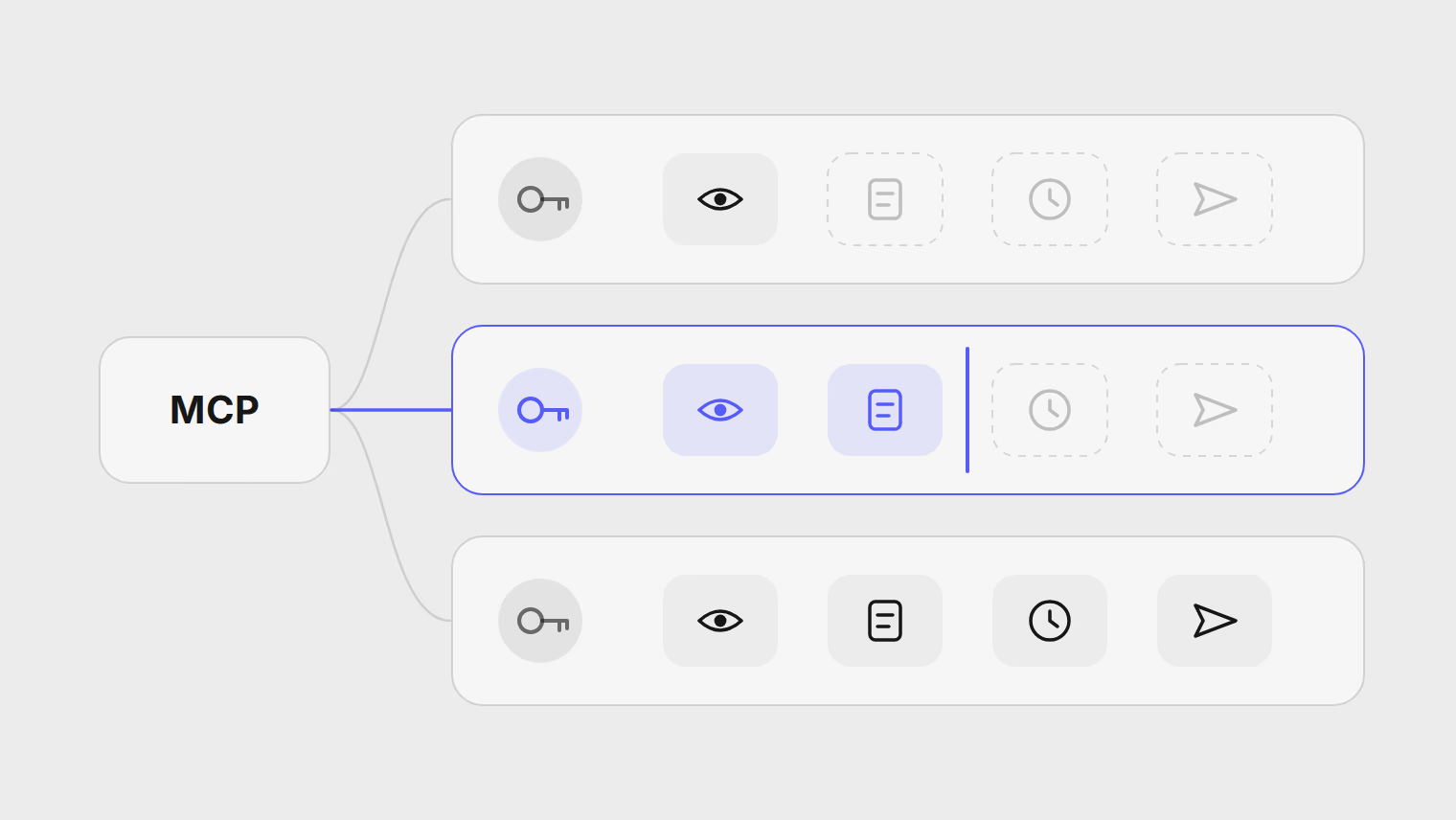
Sign in from the app. Claude (desktop and web), ChatGPT, Claude Code, Cursor, VS Code, Codex and other MCP apps connect by signing in, with no key to copy. An admin first turns on AI apps can connect to this workspace in Settings, AI apps. Then any member picks their app on that page and takes the one step it shows: a command for Claude Code, an Add to Cursor button, or the server URL to add as a custom connector in Claude or ChatGPT. The app opens Publedia in your browser, you choose the workspace, read what the app will be able to do and select Allow. A signed-in app can read the workspace, create and edit drafts, and pause or resume automations. It cannot schedule, publish, retry, cancel or reply, and it never gets more than your own role allows.
An API key, for scripts and servers. An admin creates one in Settings, Developers, under API keys, and picks a preset:
| Preset | What the assistant can do |
|---|---|
| Read only | Read posts, the calendar, channels and their health, media, analytics, the inbox (beta), automations and the brand profile. The default. |
| Drafts | Also create, edit, duplicate and tag drafts, and undo its own draft changes. A person schedules them. |
| Full control | Also schedule, reschedule, publish now, retry failed posts, cancel posts, and pause or resume automations. |
Public replies to comments are a separate permission, left out of every preset. No connection can send direct messages. The server lists only the tools a connection allows, so an assistant on read-only access never sees a publish tool. Keys expire after 30, 90 or 365 days and are shown once. Every step and error message is in connect Claude, Cursor or another AI app with MCP.
The server also offers three prompts: Review performance, Plan posts and Triage the inbox. MCP prompts are user-controlled, so apps show them in a menu or as slash commands. Both Plan posts and Triage the inbox tell the assistant to wait for your approval before it writes anything.
What to keep behind approval
The MCP tools specification says a human should always be able to deny a tool call, and that apps should ask before sensitive operations.
- Scheduling and publishing. With drafts access, each post waits until a person checks every channel's preview and schedules it.
- Replies to comments, above all complaints. Leave reply access off unless someone reads each reply first.
- Cancelling. A cancelled post stops for good and cannot be rescheduled.
- Deciding what your brand says, and when it says nothing.
Risks: prompt injection and the wrong account
A connection cannot touch another workspace, so it cannot post for another client. Inside its workspace, the assistant can still pick the wrong channel or post, so ask for drafts and check the channel on each. Agencies do best with one workspace per client; see keeping client accounts separate. Give each app and machine its own key, so revoking one leaves the rest working.
When not to give full control
- When the same session reads untrusted text: inbox triage, web pages, feeds.
- Before the workflow has run on Drafts until its drafts rarely need changes.
- When other people can prompt the app, or it runs unattended on a shared machine.
- For a one-off bulk change, such as moving Friday's posts to Monday: create a Full control key for the job and revoke it afterwards.
A key that can schedule but not publish can only schedule at least 15 minutes ahead, which leaves time to catch a post in the calendar. If every new article should become posts the same way, an RSS feed automation needs no assistant or key.
Fuentes
Temas
- MCP
- AI agents
- Claude
- ChatGPT
- Automation