Alt text for social media images: limits by network and worked examples
How to write alt text for screenshots, charts, quote cards, product photos and memes, the limit on each network, and what to do when a tool cannot send it.
Bu makale yalnızca İngilizce olarak mevcut.
Alt text is the description a screen reader speaks in place of an image. On social media it carries whatever the image says that the post text does not: the words in a screenshot, the point of a chart, the joke in a meme. Write it for someone scrolling the same feed without the picture. Usually one or two sentences is enough; an image of text needs the text itself.
This guide covers what each network accepts, then works through the six kinds of image that show up most in social posts, with weak and better versions of each.
What each network accepts
| Network | Limit | Where it applies | Edit after posting |
|---|---|---|---|
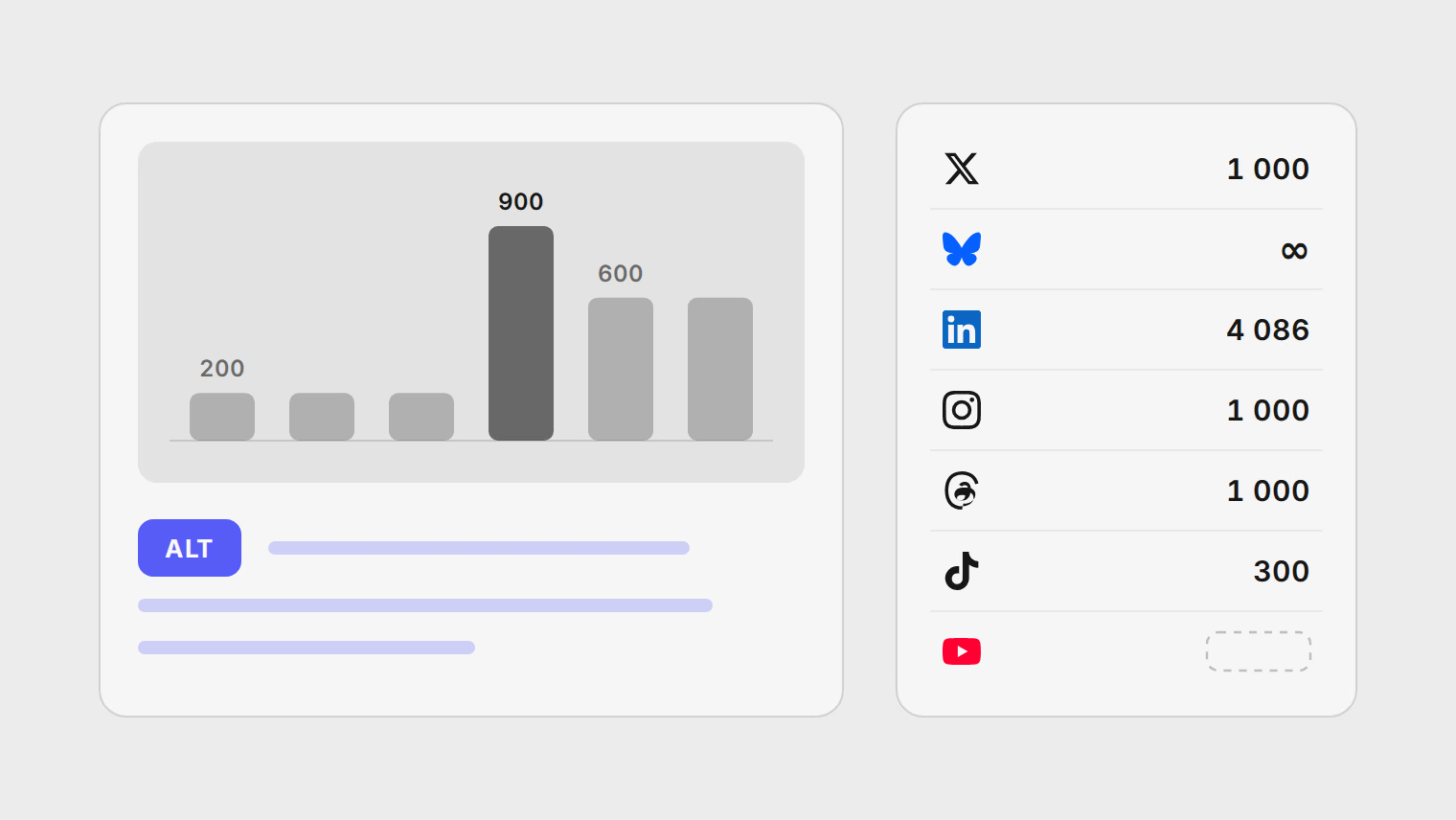
| X | 1,000 characters | Images | No |
| Bluesky | No limit in the protocol | Images and video | Not documented |
| 4,086 characters; LinkedIn recommends under 120 | Images | Not documented | |
| 1,000 characters through the API | Single images and images in a carousel, not Reels or Stories | Yes, in the app | |
| Threads | 1,000 characters through the API | Images and video | No; add it before posting |
| Not stated | Photos | Yes, in the app | |
| TikTok | 300 characters per photo, in the TikTok app | Photo posts only | Yes, in the app |
| YouTube | No alt text | Video only; use captions instead | Not applicable |
Most numbers come from the networks' developer documentation, which is what any scheduling tool works with; TikTok's comes from its app help, since its photo alt text is documented only for the TikTok app. Whether you can fix alt text after posting comes from each network's help pages and the University of California, Berkeley's platform table, updated in March 2026. Two of the limits deserve a second look.
LinkedIn allows 4,086 characters but recommends fewer than 120. The two do not conflict: most images need a short description, and the ceiling exists for the few that need a long one.
Instagram and Facebook write automatic alt text for your photos, using object recognition to name what they see. That can be enough for a holiday photo and is close to useless for a slide of statistics.
The rules that cover most images
- Say what the image is for, not everything in it. The W3C's tutorial on images makes the point with a bird: a park's website needs "a bird", a birdwatching site needs the species. Ask what someone would miss.
- Don't start with "image of". Screen readers already announce an image. WebAIM's guidance calls "Image of..." redundant.
- Don't repeat the post text. If the caption already says "our new office in Lisbon", the alt text should add what the caption leaves out: the view, the room, who is in it.
- Put words in the image into the alt text, exactly. The W3C's rule for images of text is that the alt text is the same words.
- Leave out hashtags, keywords and emoji. A screen reader reads them aloud, one by one.
- Put the useful part first. Someone listening can move on as soon as they have what they need.
Six kinds of image, worked through
A screenshot of a post or a review
The image is a screenshot of a customer review on a review site, posted to celebrate it.
- Weak: "Screenshot of a review"
- Better: "Five-star review from Maria T. on a review site: 'Setup took ten minutes and support answered on a Sunday.'"
The person using a screen reader wants the same thing everyone else gets: who said it, and what they said. Quote the words exactly. If the screenshot is long, quote the part your post is about.
A chart
A bar chart shows newsletter sign-ups by month, January to June, with a jump in April.
- Weak: "Bar chart of sign-ups"
- Better: "Bar chart of monthly newsletter sign-ups, January to June. Flat at about 200 a month until April, when it jumps to 900, then settles near 600."
The W3C calls this a complex image: a short description that names it, plus a long description with the essential data. On social media, put the short version and the takeaway in the alt text. If the exact figures matter, put them in the post text or link to a page that has them, where everyone can read them.
A quote card
A branded graphic with a quote over a photo of the speaker.
- Weak: "Quote graphic"
- Better: "Quote from Dana Kim, head of support: 'Most failed posts fail for the same three reasons.' Dana is pictured smiling at a desk."
The quote is the content, so it goes in first and in full. The photo is secondary; a few words are enough. Leave out the brand colours and fonts unless the post is about the design.
A product photo
A launch post for a backpack in a new colour.
- Weak: "Our new backpack"
- Better: "The 20-litre backpack in olive green, front pocket open to show a laptop sleeve and a water bottle inside."
For a product, describe what a buyer would look for: the colour, the size, the feature the post is about. If the post announces a new colour, the colour is the point.
A meme or reaction image
A well-known two-panel meme, edited with your own text.
- Weak: "Funny meme"
- Better: "Two-panel meme. Top: a man waving away a plate, labelled 'Posting to five apps by hand'. Bottom: the same man smiling and pointing, labelled 'Scheduling it once'."
A joke only works if the format comes through. Say how many panels, what each one shows, and the text on each. You do not need the meme's name unless your audience would know it.
A carousel of text slides
Five slides, each with a tip in large type.
- Weak: "Slide 1", "Slide 2" and so on.
- Better, slide one: "Tip 1 of 5: Write alt text before you schedule, not after the post is live."
Each image in a carousel takes its own alt text on Instagram, LinkedIn, X and Bluesky. Give every slide its own words. If a network does not take alt text for that format, put the tips in the caption as a numbered list, so no one depends on the images.
Video is a different problem
Alt text is for images. For video, the equivalents are captions for speech and on-screen text, and a description in the post for anything the video shows but never says. Threads accepts alt text on video through its API, and Bluesky's video embed has an alt field; the other networks here take it on images only. Most networks can add captions to a video, and captions burned into the video travel to every network without depending on any of them.
Alt text and scheduling tools
A scheduling tool can only send alt text a network's API accepts, and tools differ on which ones they support. Instagram added alt text to its publishing API in March 2025, for example, and not every tool has caught up. Before you rely on it, check per network.
In Publedia, alt text you add to an image in Create post is sent to X, LinkedIn and Bluesky. It is not sent to Instagram, Threads or Facebook today, and TikTok photo posts are not published through Publedia. On Instagram and Facebook you can add alt text in the app after the post publishes.
The cross-posting guide for X, Threads and Bluesky shows how that looks for one post going to all three.
Alt text is a strong norm on Bluesky, and the Bluesky scheduling guide covers writing for its 300-grapheme posts. For every network's text and media limits in one table, see social media character limits.
A check before you schedule
- Every image has alt text, or the post text carries the same information.
- Words in images appear in the alt text exactly.
- Charts state the takeaway and the key numbers.
- No "image of", hashtags or emoji in alt text.
- Carousel slides each have their own description.
- For networks where your tool cannot send alt text, you have a plan: add it after publishing where the network allows it, post that version from the network's app, or repeat the words in the caption.
Kaynaklar
- X API reference, create media metadata (alt text up to 1,000 characters)
- Bluesky lexicon for images in a post (app.bsky.embed.images)
- Bluesky lexicon for video in a post (app.bsky.embed.video, alt field)
- LinkedIn MultiImage API (altText up to 4,086 characters, under 120 recommended)
- Instagram Platform, IG User Media reference (alt_text, added 24 March 2025)
- Threads API, publishing reference (alt_text up to 1,000 characters)
- Instagram Help, edit the alternative text for a post
- Facebook Help, edit the alternative text for a photo
- TikTok Support, accessibility for your videos (alt text on photos)
- Threads Help, edit the alternative text of your post
- UC Berkeley Digital Accessibility, alt text for social media platforms (updated 2026-03-19)
- W3C WAI, images tutorial
- W3C WAI, complex images
- W3C WAI, images of text
- WebAIM, alternative text
Konular
- Alt text
- Accessibility
- Images
- Bluesky